If you are planning to switch from Spectrum Mobile to another carrier, you cannot move your phone number without a **spectrum transfer pin**. This six-digit code, also known as a Network Transfer PIN (NTP), is required by the Federal Communications Commission (FCC) to prevent unauthorized number porting. In 2026, the process to generate this pin has been updated to enhance security. This guide will show you exactly how to find it.
Method 1: Get Spectrum Transfer PIN via My Spectrum App
The fastest and most reliable method to generate your port-out details in 2026 is through the official Spectrum mobile application. Make sure your app is updated to the latest version.
- Log into the My Spectrum app.
- Navigate to the Billing tab.
- Scroll down and tap on **Spectrum Mobile** (if you have multiple services).
- Find and select the line you want to transfer.
- Look for an option labeled **Request Transfer PIN** and follow the security prompts (often via SMS verification).
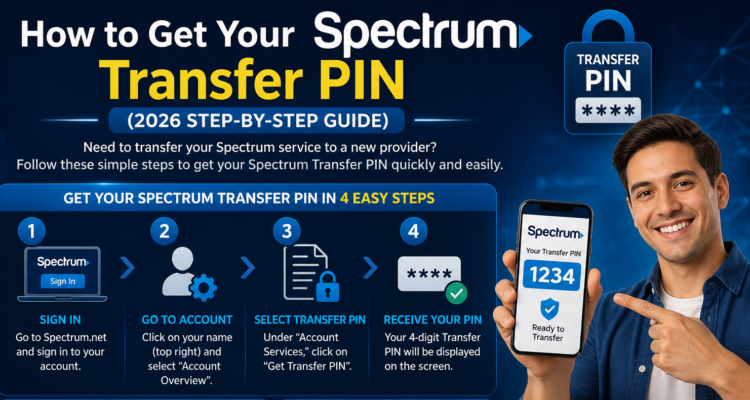
Method 2: Get Spectrum Transfer PIN via the Website (Online Account)
If you don't have the app, you can use Spectrum's online portal from a computer browser. T-Mobile users often face **server errors** when requesting pins, but Spectrum's online portal is usually more stable.
- Go to **Spectrum.net** and sign in.
- Click on **Your Services** at the top.
- Choose **Mobile**.
- Select the mobile line you wish to port out.
- Tap **Get Transfer PIN**. The pin will be displayed on the screen.
How to Port Your Number to a New Carrier
Once you have your spectrum transfer pin and your Spectrum account number (which is also visible on your bill or in the app), you are ready to switch. Give these details to your new carrier. Make sure your Spectrum account remains active until the transfer is complete, or you risk losing your number.
We have guides for other major carriers too. Check how to get your Straight Talk transfer pin or AT&T details.
Is Your Phone Eligible for the Move?
Keep in mind that Spectrum is on the Verizon network. To use your phone on a different network (like T-Mobile or AT&T), your device must be fully paid off and unlocked. If you're using an older device, check if it's worth repairing before investing in a new carrier plan.