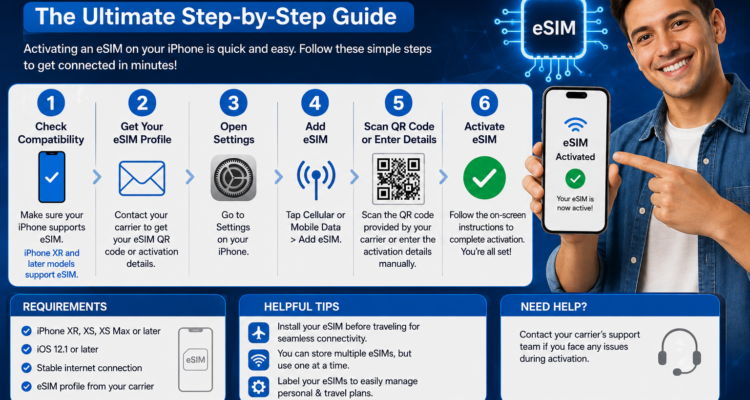
Switching your cellular service over to a digital profile is the fastest way to get connected without waiting for a plastic card to arrive in the mail. If you are setting up a brand-new device or adding a secondary profile, knowing exactly how to activate esim on iphone can save you a tedious trip to a physical retail outlet.
Article at a Glance:
- The Setup Methods: Choose from Carrier Carrier Activation, iPhone Quick Transfer, or scanning a standard QR code layout.
- Core Requirements: An unlocked iPhone XS or newer, an active Wi-Fi connection, and an active plan from a supported network provider.
- Major Carriers: Verizon, AT&T, T-Mobile, and Boost Mobile offer streamlined automation profiles for Apple products.
- Troubleshooting Tip: If your network data profile hangs during installation, a quick restart fixes minor handshake delays.
At MobileCares, we watch how mobile technology evolves. Making the jump to an embedded cellular profile is highly secure, but configuration mismatches can cause sudden errors. Let us break down how to get your new line functioning perfectly within a matter of minutes.
Watch: Complete iPhone eSIM Activation Setup Walkthrough
The 3 Main Ways to Activate eSIM on an iPhone
Apple supports multiple direct integration procedures to load a digital cellular profile securely into your hardware logic board, depending on where you acquired the plan:
1. eSIM Carrier Activation (Automated Provisioning)
When you purchase a line straight from an operator, they can push the profile details out over the air. A notification saying "Carrier Cellular Plan Ready to be Installed" will appear on your Home Screen. Simply tap that banner, click Continue, and your line initializes itself instantly.
2. eSIM Quick Transfer (Moving from an Old iPhone)
Upgrading your primary daily driver? Go to Settings > Cellular > Add Cellular Plan on your new hardware. Select the option to sync data from a nearby device. Keep your old iPhone close by with Bluetooth turned on, confirm the security passcode prompt, and your active number migrates across immediately.
3. Scanning a Carrier QR Code Layout
If you are utilizing an international roaming profile or a prepaid plan from a budget virtual carrier, you will receive a digital barcode via email. Launch your built-in **Camera app**, point it at the voucher, and hit the **Cellular Plan Detected** pop-up box to install the backend settings.
iPhone eSIM Setup Methods Compared
| Setup Pathway | Ideal For | What Is Required |
|---|---|---|
| Carrier Activation | Direct phone upgrades & major postpaid contracts | An automated on-screen notification |
| eSIM Quick Transfer | Upgrading between two local iPhone units | Old iPhone unlocked with Bluetooth enabled |
| QR Code Scan | Prepaid providers, MVNOs, and travel data packages | A digital image or printed copy of the barcode |
How to Verify Your Digital Line Status
Once you finish running the configuration scripts, look up at the top-right corner of your panel. Your regular carrier signal bars should light up. If you chose to operate two numbers at the exact same time via Dual SIM features, you will see two separate indicator levels stacked vertically inside the Control Center tray.
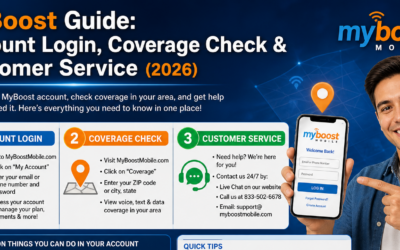
Are you running into activation issues, or did your line get stuck after updating your device software? Read our extensive Verizon Port Status Check Guide to see how to monitor network migrations, or take a look at our MyBoost Coverage & Customer Service Guide to solve cross-carrier connection problems. If you suspect a hardware antenna malfunction is blocking the download, check out our diagnostic walkthroughs inside our Expert iPhone Repair El Paso TX Hub.
Frequently Asked Questions (FAQs)
Can I turn my old physical plastic SIM card into an eSIM? +
Yes! If your network supports this conversion feature, you can open Settings > Cellular, tap 'Convert to eSIM', and authorize the security prompt without buying a new card.
Do I have to stay connected to Wi-Fi during the installation process? +
Yes, your iPhone needs a live Wi-Fi link to fetch the network profiles and cryptographic keys securely from Apple servers during activation.
What happens to my cell plan if I accidentally erase my iPhone? +
When running a factory reset, your phone will explicitly ask if you wish to keep or delete your cellular plans. If you wipe them out, you must contact your network operator to request a fresh QR code setup configuration.