Are you planning to switch from Boost Mobile to a different carrier in 2026? Whether you're moving for better coverage or a new device deal, the process requires two critical pieces of information: your 9-digit account number and a 6-digit boost transfer pin. Without these, your "porting" request will be rejected, leaving your phone number in limbo.
Why Do You Need a Boost Transfer PIN?
A Transfer PIN (also known as a Port-Out PIN) is a security measure designed to prevent "SIM swapping" and unauthorized number transfers. If someone gets hold of your account number, they still can't steal your phone number unless they have this unique code. This is especially important if you use your phone for Apple Card management or high-security banking apps.
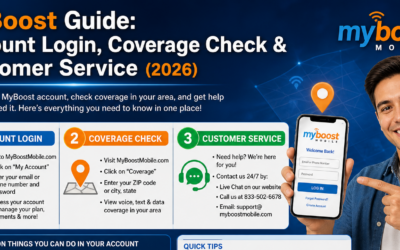
How to Find Your Boost Mobile Account Number
Before requesting a PIN, you need your account number. Boost doesn't always make this easy to find on the app. Here are the three most reliable ways:
- The Welcome Email: Search your inbox for your initial activation email; the account number is usually listed at the top.
- Online Portal: Log in to the Boost Mobile website, go to "Account Settings," and check the "Profile" section.
- Customer Support: Dial 611 from your Boost phone and ask the automated system or a representative for your 9-digit account number.
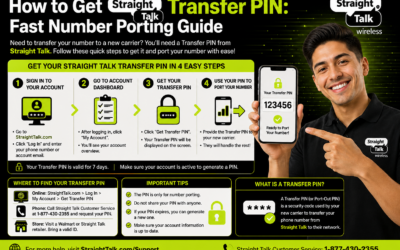
Step-by-Step: Getting Your Boost Transfer PIN
In 2026, the process is mostly digital. Follow these steps to generate your code in under 5 minutes:
- Open the My Boost App on your iPhone or Android.
- Navigate to the "Line Settings" or "Account Security" tab.
- Click on the option that says "Request Transfer PIN".
- Verify your identity via a one-time SMS code.
- Once verified, your 6-digit boost transfer pin will be displayed on the screen and sent via SMS.
Troubleshooting: What if the PIN Doesn't Work?
If your new carrier (like T-Mobile or Verizon) says the PIN is invalid, check for these common issues:
- Expiration: Most boost transfer pins expire after 7 days. If you waited too long, you'll need to generate a new one.
- Device Lock: Even with a PIN, your phone won't work on a new network if it's still locked. Check our Device Unlock App Guide to see how the process works for other carriers.
- Pending Status: Sometimes the transfer is approved but takes time. You can track this using a Verizon port status tool or similar carrier portals.
Switching to a New iPhone?
If your move to a new carrier involves getting the latest iPhone 16 or 17, make sure you are prepared for the setup. Many users forget to back up their data or clear their storage before switching. Learn how to clear system data on iPhone to ensure your new device starts fresh and fast.
Additionally, if you're taking advantage of a T-Mobile Apple Bundle after porting out from Boost, ensure you understand the warranty terms. Our iPhone 17 repair guide covers everything you need to know about Apple’s 2026 warranty policies.
Maintenance After Porting
Once your number has successfully moved, don't forget to handle your old Boost device properly. If you're trading it in, follow the device recovery and return guide to avoid non-return fees. Also, if you were using an Apple Watch, you'll need to update its cellular plan. See our guide on Apple Watch setup for budget-friendly alternatives.